
Easily calculate your final grade by entering each assignment and its weight. Add as many assignments as needed.
Your Assignments
| Name | Score (%) | Weight (%) | Action |
|---|
Weighted Final Grade
The Weighted Grade Calculator simplifies calculating your final course grade by combining all assignment scores with their respective weights into a single accurate result. Users can add custom assignments, visualize results through a clear chart, and export everything as a PDF, making it a reliable tool for students to stay on top of their academic performance.
Formula used for calculation:
Final Grade:
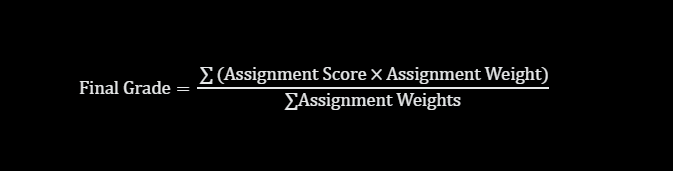
Where:
Assignment Score refers to the percentage earned on each assignment, ranging from 0 to 100.
Assignment Weight refers to the percentage contribution each assignment makes toward the final grade.
For accurate results, all assignment weights should ideally total 100%.
If the sum of all weights is 0, the final grade is automatically set to 0 to avoid division by zero errors.
A Simple Guide to Using the Weighted Grade Calculator
Calculating your weighted course grade is quick and easy—just follow these simple steps:
- Enter each assignment name, your score (%), and its weight (%) into the form
- Click “Add” or press Enter to include it in your calculation
- View your updated final grade instantly along with a complete assignment table
- Check the bar chart for a clear visual breakdown of your performance
- Use your browser’s Print-to-PDF option to save all results on a single clean page
Reasons to Use the Weighted Grade Calculator
This calculator simplifies weighted grade calculations with easy inputs and instant visual feedback throughout the process.
- Flexible Inputs: Add unlimited assignments with custom names, scores, and weights
- Accurate Results: Calculates your final grade by properly applying each assignment’s weight
- Visual Chart: Displays assignment scores in a clear, color-coded bar chart
- Weight Alerts: Notifies you if total weights do not equal 100%, ensuring accurate calculations
- PDF Export: Generates a clean, single-page PDF directly from your browser